Load your history
Select an instrument and download its history with the built-in loader, or open a TradingView CSV. Inspect the chart before starting the calculation.
ELLIOTT WAVE · LIGHT & PRO
Select a chart range and start an automatic search for wave counts. Compare alternatives and nested degrees across stocks, ETFs, indices, currency pairs, crypto and futures.
Pro is a Windows application. Light uses a browser interface and a required Windows module. You start each calculation and check the candidates against the source bars.
Choose your workspace ↓PRO · WINDOWS
Select an instrument and download its history with the built-in loader, or open a TradingView CSV. Inspect the chart before starting the calculation.
Analyze the full history or select a local trend with the LBC cursor. You can also set a start and an end for a specific section.
Switch between alternative counts and wave degrees. Save calculations so you can return to your work.
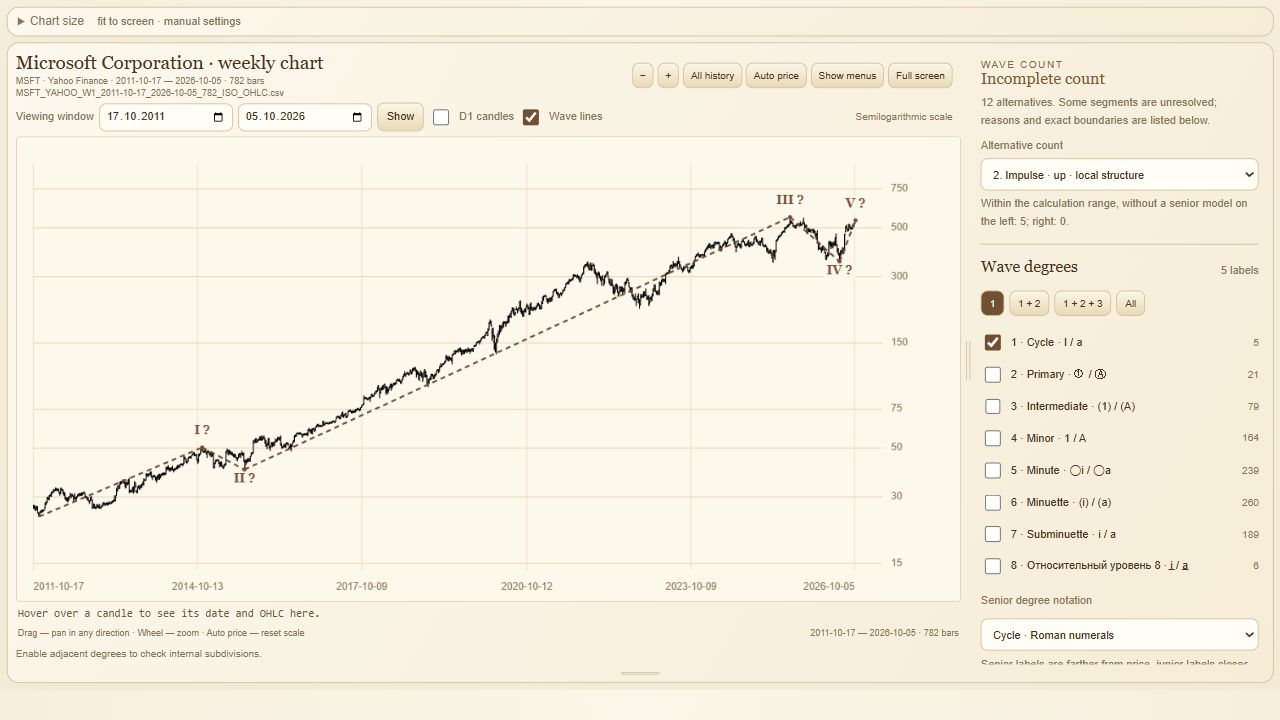
Wave counts are analytical hypotheses. Compare the alternatives with your quotes and your own market assessment.
GLOBAL MARKETS · ONE ANALYTICAL APPROACH
From European equities to major currency pairs. Explore price structure, compare alternative counts and choose the depth your analysis needs.
instrument classes
Companies around the world
Indices, sectors and investment themes
The broader market picture
Major currency pairs
Bitcoin, Ethereum and more
Metals, energy and other commodities
United States · Canada · Brazil · Mexico
Germany · United Kingdom · France · Italy
Japan · Hong Kong · India · South Korea
Australia · New Zealand
A single move or the bigger picture: choose your timeframe and history range with LBC.
Instrument availability and historical depth vary by market. Analysis uses downloaded, completed bars; this is not a real-time market data stream.
The creator of the application
Founder of Student Wyckoff · creator of Elliott Wave
Igor has studied financial markets for more than 30 years. He is the author of books and educational materials and develops analytical platforms.
His work focuses on price structure, wave analysis and independently checking market scenarios.

STUDENT WYCKOFF · ELLIOTT WAVE
One approach to wave analysis. Light for daily, weekly and monthly charts in your browser. Pro for a standalone application with your own market data imports.
For daily, weekly and monthly chart analysis. Built-in international quote downloads, LBC range selection and up to 7 nested degrees. Browser workspace with a Windows module. D1: up to 3 years · W1 and MN1: up to 150 bars.
Daily, weekly and monthly bars
A standalone Windows application. Built-in international quote downloads and your own TradingView CSV, saved calculations and flexible history selection.
Built-in downloads · TradingView CSV
Elliott Wave Extra Light labels wave structures directly on your TradingView chart. Select up to 1,000 bars and explore up to five linked wave degrees.
The indicator is provided in the language agreed before payment.
Up to 1,000 bars · 5 degrees
International instruments across six asset classes. Work with the markets you follow and understand.
Daily, weekly or monthly. All loaded history, a local trend or a start–finish range.
Compare alternatives, inspect nested degrees and keep your own market assessment in view.
STUDENT WYCKOFF · ELLIOTT WAVE
Compare versions, prepare your data and choose the history you want to analyze.
One approach to wave analysis. Light for daily, weekly and monthly charts in your browser. Pro for a standalone application with your own market data imports.
Read the guideExport TradingView data to CSV, load it into Elliott Wave Pro, check the timeframe and choose an LBC range before calculating waves.
Read the guideSet LBC or a start–finish range in Elliott Wave Pro and Light. Analyze a local trend while keeping the context and limits of your data in view.
Read the guideRun a first calculation in Elliott Wave Pro or Light: check price data, choose a range, start analysis and read the result.
Read the guideRead larger and nested wave degrees in Elliott Wave Pro and Light without losing the wider context when adding detail.
Read the guideCompare alternative counts in Elliott Wave Pro and Light using identical price data and understand why results may change.
Read the guideLearn the basic Elliott wave structure, impulse and correction, nested degrees and the limits of a wave count, with a simple teaching diagram.
Read the guideA step-by-step introduction to manual Elliott wave counting: fix the chart context, label one degree, check an example and practise identifying an invalid count.
Read the guideCheck three key price rules for an ordinary Elliott impulse, distinguish rules from guidelines, and understand why subdivisions and model context matter.
Read the guideImpulse, diagonals, zigzags, three flat variants, triangles and combinations: subdivisions, larger-wave positions, invented examples and a practice check.
Read the guideCalculate Elliott wave Fibonacci retracements and projections, choose anchors, compare linear and logarithmic scales, and practise separating ratios from rules.
Read the guideUnderstand alternative Elliott wave interpretations, changing data, incomplete structures and the limits of automatic counts, with a practical review checklist.
Read the guideChoose your product. Every plan lasts 3 calendar months. The owner grants access after actually receiving payment.